Lucy Wu

2023
Building a UI Kit that Scales
Bringing structure and speed to a growing
tele-health platform
PulseOx
90/66
(12:24Pm)
About the
Project
My Role: UX/UI Designer
Team: Allison Spillane (UI Designer), Sara Sailors (Engineering Lead)
Year: 2023
Duration: One Year
When I joined Health Recovery Solutions (HRS). a startup specializing in remote patient monitoring (RPM) and telehealth, I worked on enhancing ClinicianConnect, a central web portal used by clinicians to triage patient data, track vitals, and manage care workflows, all integrated with electronic health records (EHRs).
The Problem
HRS’s core web platform supporting clinicians was scaling quickly. But as new features were shipped at a rapid pace, with no shared system to guide design or development, the interface started developing, inconsistent UI patterns, duplicated components, a lack of scalable, reusable systems.
Design and engineering teams were spending unnecessary time rebuilding components and troubleshooting inconsistencies, slowing velocity and increasing maintenance costs.
The Solution
To help teams move faster, and design more consistently, my teammate and I built a scalable UI Kit in Figma, implementing Brad Frost’s atomic design principles to deliver immediate value to design and engineering.
Exploring the
Interface
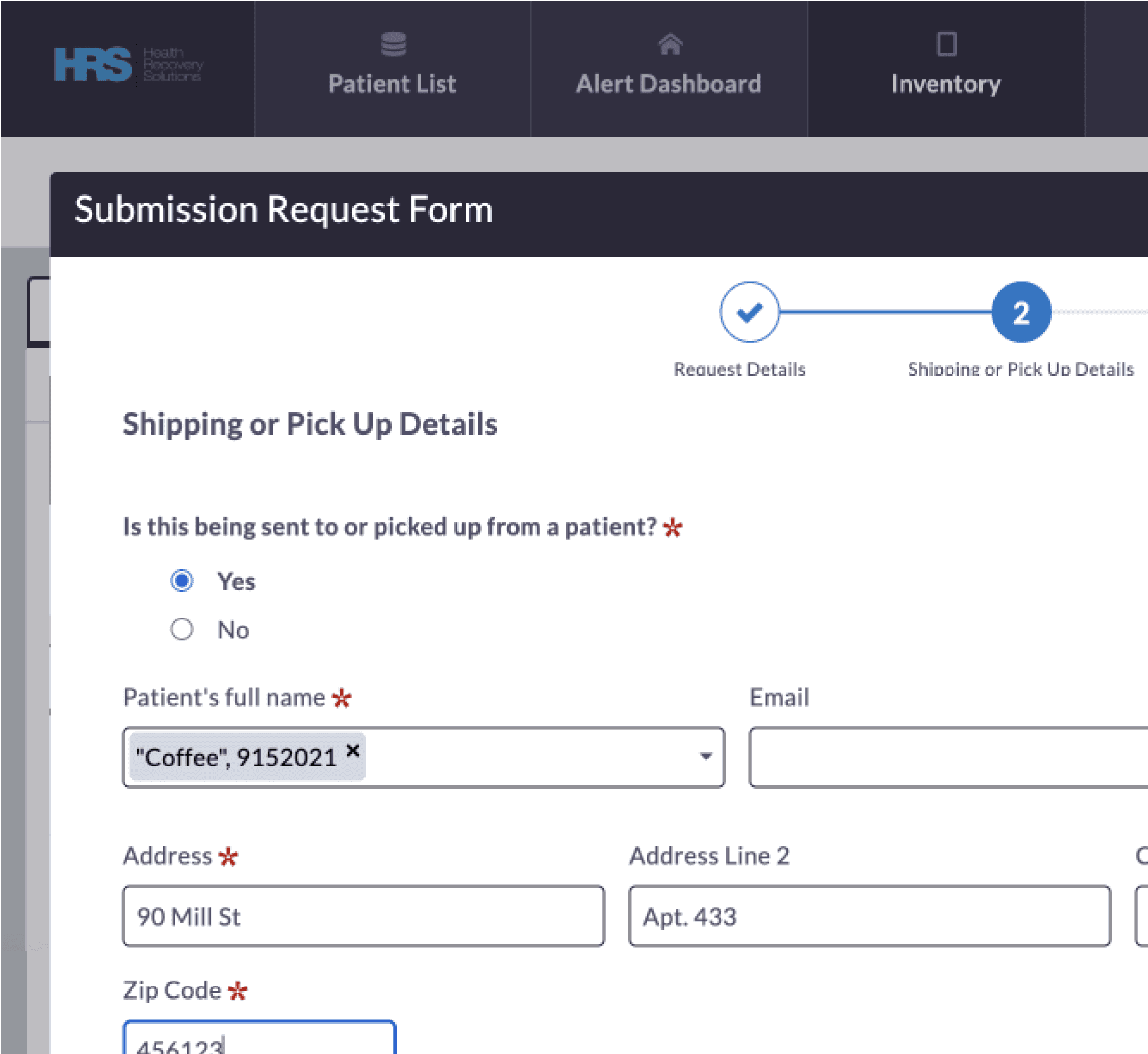
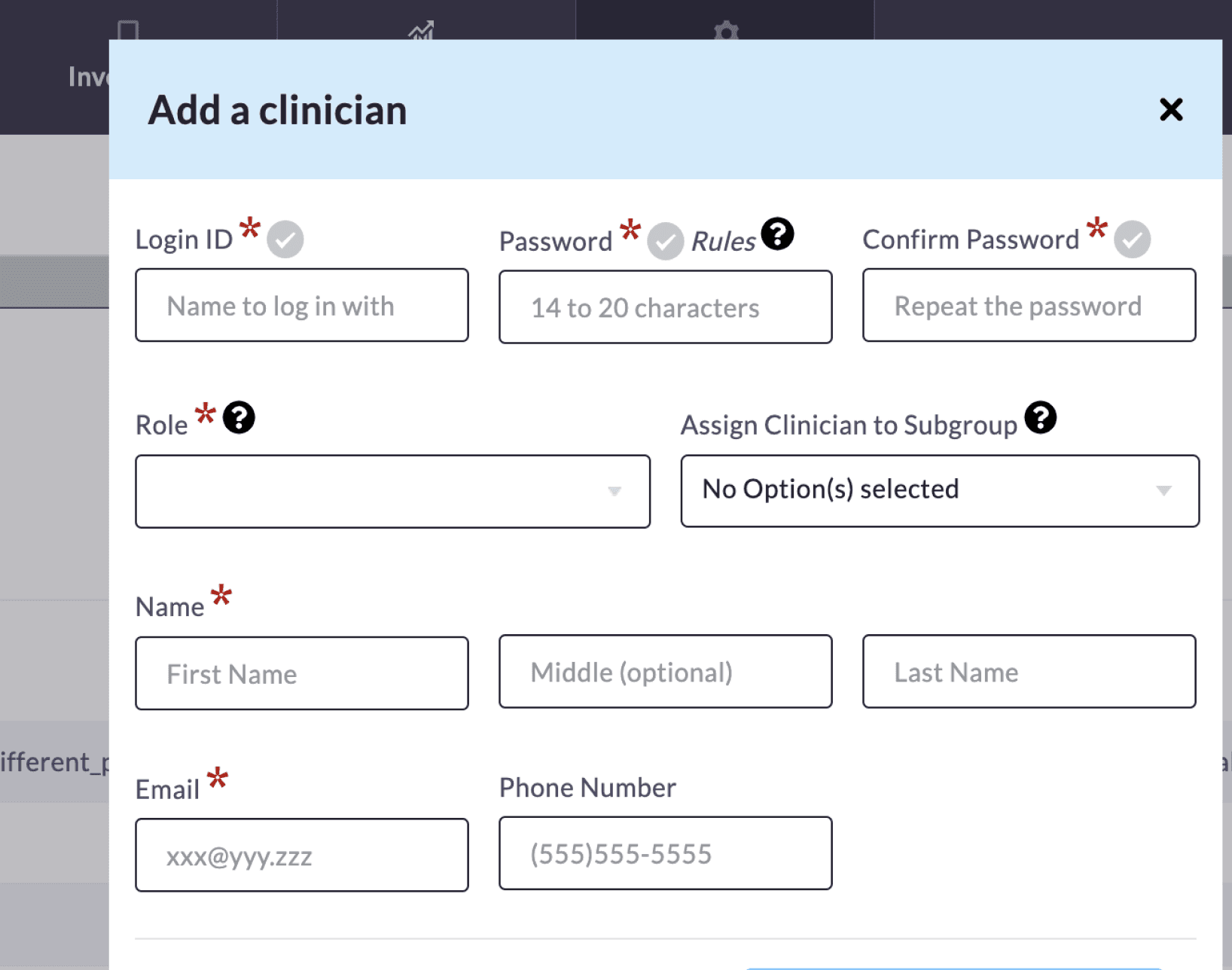
We started with a full UI walkthrough of the product. Rather than rely on assumptions, we noted interface patterns across key screens and what components were currently used. This quickly revealed inconsistent button styles, form labels, and modal behaviors that had evolved without a shared structure, These inconsistencies made it difficult for users to predict system behavior and increased cognitive load during form completion.
01
Observed Validation Variatons
04
03
02
01
Default field
02
Required field + success feedback
03
Required field + success + help icon
04
Required field
Variability in input styling and validation states spotted across clinician workflows.
Defining the
Scope
Our system review made it clear there was plenty we could improve and knowing ClinicianConnect would eventually need a full design system, our small team focused on what mattered most now. We asked ourselves:
What’s causing the most friction right now?
What can we improve for immediate value?
The answers led us to create a flexible, Figma-based UI kit to
Support current design and development needs
Reduce visual inconsistencies
Lay the groundwork for a future, full-scale design system
Competitive
Analysis
To validate our direction, we reviewed established systems like Material and IBM Carbon, not to replicate them, but to understand common structural foundations and scalable documentation practices.
This reinforced that starting with a lean, well-organized UI Kit was a smart and realistic step for where ClinicianConnect was headed.
Material Design
What Works
Exceptional documentation
Beginner-friendly onboarding
Well-defined component anatomy
Where It Breaks Down
Can be overly prescriptive
Customization becomes harder without breaking key patterns
Design Takeaways
Adopted Material’s component anatomy
and documentation approach while
preserving flexibility.

Carbon Design
What Works
Clear and minimal navigation
Documentation that supports scale
Defines accessibility user groups
Where It Breaks Down
Visual style can feel rigid
Extensive documentation can feel overwhelming at first
Design Takeaways
Going smaller first would make the system easier to use, and maintain.
Variability in input styling and validation states spotted across clinician workflows.
UI Audit: Making
Sense of a Mess
Next, we cataloged dozens of live screens and tagged each reusable UI component. This audit gave us clear visibility into what actually existed within ClinicianConnect and resulted in a concrete component inventory.
Using Brad Frost’s atomic design principles, we audited live screens by tagging UI elements,
creating a component inventory, identifying gaps needed to build a scalable system.
Design
Development
With our findings in hand, we began building the Figma-based UI Kit using atomic design principles. We started small, prioritizing clarity, reusability, and accessibility. The UI Kit was used immediately as we built it, allowing new features to be constructed using standardized components in real time.
Visual Foundations
Typography
ClinicianConnect
H1
22px/Semibold
ClinicianConnect
H2
16px/Bold
This UI Kit was built to support
reusability across screens and teams
Body Paragraph
16px/Regular
Sizing and Spacing
All component sizing should be in multiples of 8px or 4px, 8px is preferable. Consistent, standard, and scalable.
Example: System modal with real-world copy

H2
Body Paragraph
Colors
Colors used to support hierarchy, feedback,
and interaction.
Accent and Functional Colors
Primary
Default
Hover
Selected
Success
Confirmed/Saved
Warning
Cautionary States
Danger
Errors & Destructive
Neutral System Colors
Active
Selected or Non-primary Elements
Disabled
Non-interactive, disabled states
Icons
Icons used across core flows to reinforce actions and system states.
Core Components
Built on System Foundations
Input Fields
Input fields for text entry and validation.
Enabled
Focused
Filled
Input stroke outlines and helper text colors are exaggerated for documentation clarity.
Buttons
Buttons across core flows (default and disabled states).
Primary
Secondary
Default
Button
Button
Disabled
Button
Button

FORGOT PASSWORD?
Enter your username below to reset your password.
Username
Back
Submit
Semi-transparent
surface (≈85%) for Login,
Forgot Password.
LOGIN
Email or Username
Password
Forgot Password?
Sign In
System in Context
Standardized components applied to authentication workflows. The login card sits on a semi-transparent surface to separate it from the background.
The
Outcome
Standardized 40+ UI components across 12 key workflows.
Reduced interface inconsistencies and improved predictability during form completion.Smaller supporting paragraph.Right now it’s paragraph-first. That lowers impact.Metrics or bold impact should come first.
What’s Next
Before wrapping up my contribution, I partnered with my team to define clear priorities for evolving the UI Kit beyond a component library and towards a more scalable system, we decided upon the following:
Component Standardization
txte here
Promoting Internal Adoption
Supporting onboarding for new designers and engineers and continuing documentation efforts.
Improve Accessibility
Make sure visuals, gestures, and language support users with varying cognitive and emotional needs.
Thank you for reading! Explore other work
2023
Mental Health | Game Design | Mobile
Mindful
Retention
Inviting Users Back with
Purposeful Play
View the Case Study